Variables and Scope in JavaScript for LWC Developers
Understand let, const, and var in Lightning Web Components. Learn how scope works in JavaScript and how it impacts rendering, event handling, and data binding in Salesforce LWC.

Illustration of how variable declarations flow through component scope.
How you declare a variable in JavaScript might seem like a minor detail. However, it’s fundamental to how your Lightning Web Components behave. Using let, const, and the older var incorrectly can lead to rendering bugs and unpredictable behavior.
Related reading: JavaScript for LWC Developers – Series Intro.
What is Scope?
In plain language, scope defines where a variable can be accessed. If you declare a variable inside a certain scope, you can’t see it from the outside. Think of it like rooms in a house: a variable in the “kitchen” isn’t visible in the “bedroom.”
JavaScript has a few types of scope. However, for LWC developers, these are the most important ones:
- Global Scope: Accessible from anywhere. In LWC, you rarely interact with the true global scope (
window) directly. - Function Scope: Variables declared inside a function are only visible within that function.
- Block Scope: Variables declared inside a block (
{...}) are only visible there. This is whereletandconstshine.
Reference: MDN JavaScript Scope.
var vs. let vs. const
The keyword you use to declare a variable determines its scope and rules.
var: The Old Way
var is function-scoped. This means it ignores block scope, which often causes confusion.
CODEBLOCK_0_END
Because of this and other quirks like hoisting, modern JavaScript development, especially in LWC, avoids var.
let: The Safer Choice
let is block-scoped. Therefore, it’s your go-to when a variable’s value needs to change.
CODEBLOCK_1_END
Use let for loop counters or variables you plan to reassign.
Reference: MDN let
const: The Constant
const is also block-scoped, but you cannot reassign its value after declaring it. This makes your code more predictable and prevents accidental changes.
CODEBLOCK_2_END
For objects and arrays declared with const, you can still change contents, but you cannot reassign the variable itself.
Reference: MDN const
How Scope Impacts LWC Rendering
Your LWC template can only “see” properties that exist on the component’s class instance. Therefore, variables declared inside methods remain invisible to the template.
Example:
CODEBLOCK_3_END
And here’s the template:
CODEBLOCK_4_END
When you click the button, greeting updates on screen. However, localMessage never appears, because it only exists inside the method.
Reference: Salesforce LWC Docs – Variables
Scope Chain Flowchart
Here’s a simple way to visualize how the LWC engine finds your data.
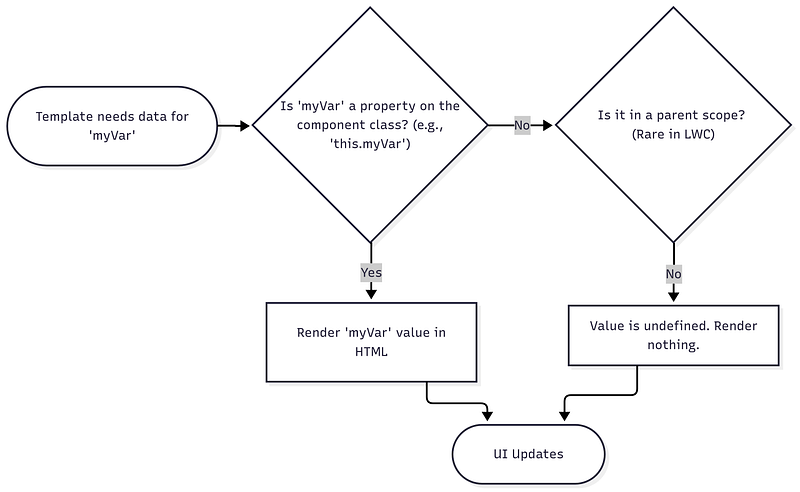
A visual guide to how the LWC engine resolves variables in scope.
Takeaway
Your default choice in LWC should be const. If you need to reassign, use let. However, avoid var to prevent scope-related bugs. For your template to display data, it must be a class property (this.myProperty), not a local variable inside a method.