Functions vs. Arrow Functions in JavaScript for LWC
Learn when to use traditional functions and arrow functions in JavaScript. See how lexical this helps avoid event handler bugs in Salesforce Lightning Web Components.

Functions are the building blocks of any JavaScript application, and in Lightning Web Components, they’re essential for everything from handling user clicks to processing data. But not all functions are created equal. Modern JavaScript gives us two primary syntaxes: traditional functions and arrow functions. Knowing when to use each is key to writing clean, bug-free LWC.
The Old School: Traditional Functions
You’ve seen these everywhere. The function keyword has been around since the beginning of JavaScript.
CODEBLOCK_0_END
This syntax is clear. However, the catch is how it handles the this keyword. In LWC, that can trigger tricky bugs.
The New Way: Arrow Functions
In contrast, ES6 introduced arrow functions (=>). They offer a concise syntax and are often anonymous, assigned to a variable.
CODEBLOCK_1_END
Notice it’s shorter. You don’t need the function keyword. For one-liners, drop braces and return.
CODEBLOCK_2_END
However, the real win isn’t the syntax. It’s how arrow functions handle scope.
The Main Event: this and Lexical Scope
First, the key difference: this context.
- A traditional function gets its own this based on how it’s called. In LWC event handlers, this points to the element that fired the event (for example, lightning-button), not the component. So you can’t access component properties with this.myProperty.
- An arrow function does not have its own
this. Instead, it inheritsthisfrom its parent scope. This is called lexical scoping. In an LWC, the parent scope is the component class, sothiscorrectly refers to the component instance.
Let’s see this in action. Imagine you have a component property message you want to update on a button click.
The Problem: Traditional Function in an Event Handler
This code will fail.
CODEBLOCK_3_END
Inside that function, this is the lightning-button, so this.message is undefined.
The Solution: Arrow Function to the Rescue
This version works.
CODEBLOCK_4_END
Because the arrow function inherits this from MyComponent, this.message refers to the component’s property as intended.
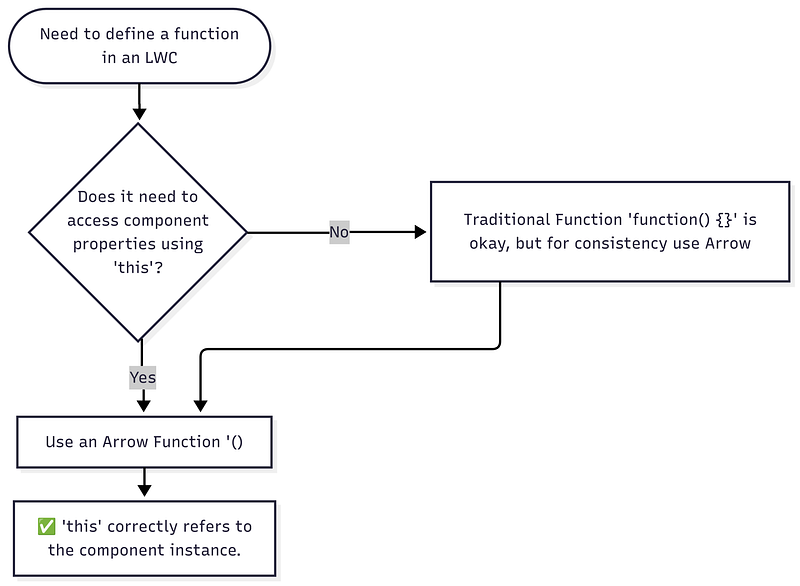
Decision Flowchart
When you choose between function types in LWC, it usually comes down to this.
Takeaway
While traditional functions have their place, arrow functions are the default choice for LWC. Their concise syntax and, more importantly, their lexical handling of this prevent common bugs, especially with event handlers and callbacks. When in doubt, use an arrow function.